Bulk rename Google Drive files in seconds.
Google Drive renames one file at a time. RenameBee renames dozens or hundreds at once – with a live preview, duplicate checks, and one-click undo.
Add to Chrome – it’s free See pricing
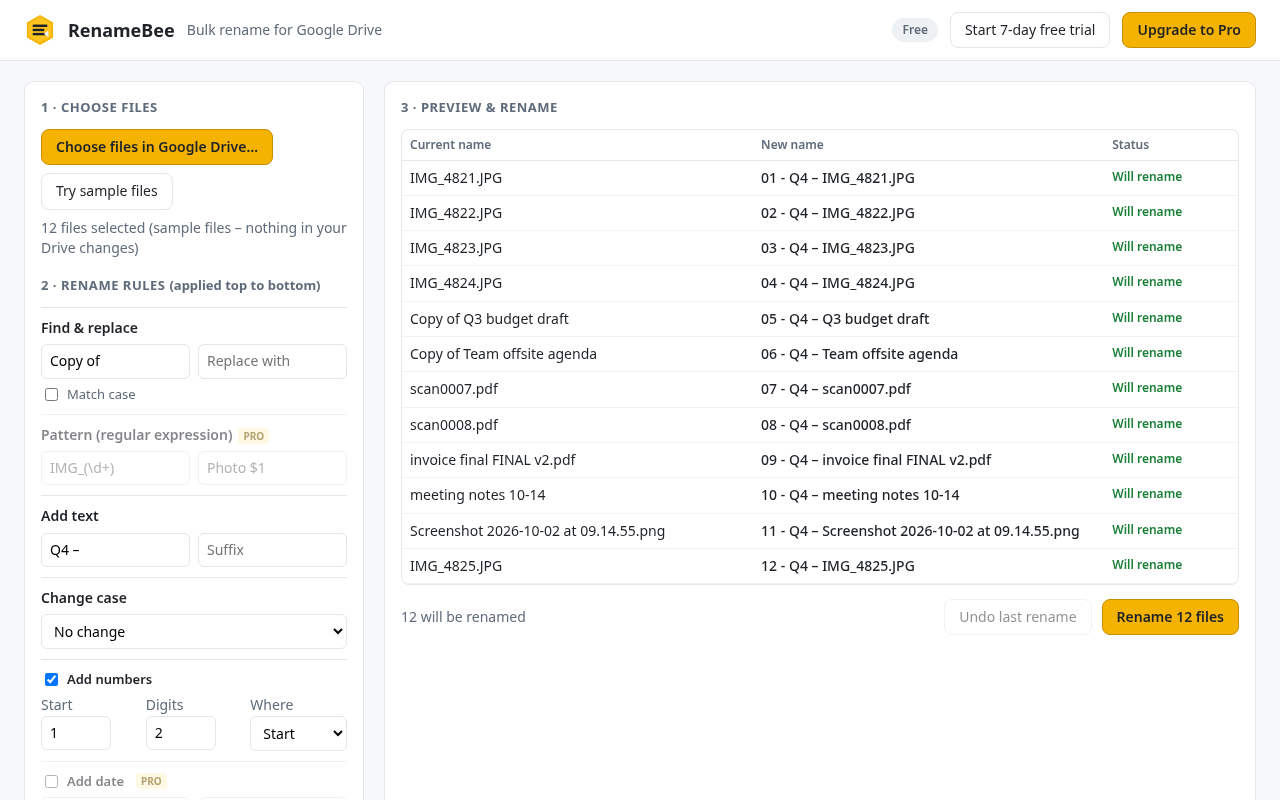
Google Drive renames one file at a time. RenameBee renames dozens or hundreds at once – with a live preview, duplicate checks, and one-click undo.
Add to Chrome – it’s free See pricing
or $5.99/month
Payments are processed securely by ExtensionPay and Stripe. Prices in USD; sales tax may apply.
No. RenameBee uses Google’s most limited Drive permission (“drive.file”). It can only see and rename the specific files you pick in Google’s file picker. It never sees anything else in your Drive.
No. It only reads file names and basic details (like type and dates) and changes names. File contents are never opened, and nothing is sent to or stored on our servers.
You can open folders in the picker and select the files inside them (use Shift-click or Ctrl/Cmd-A to select many). Because of Google’s privacy rules, picking a folder lets RenameBee rename the folder itself, but not the files inside it.
Yes, for files you have permission to edit.
Every rename is previewed first, and “Undo last rename” puts the previous names back (the last 10 batches are remembered).
You keep the free version (up to 25 files at a time). You are never charged unless you choose to upgrade.
Open RenameBee, click Upgrade/Manage, and cancel anytime. Not happy? Email us within 14 days of a payment for a full refund.
Google Chrome on Windows, Mac, Linux and ChromeOS. Other Chromium browsers may work but are not officially supported.